
File and folders targeted by bots
Threat actors are no longer just hunting for individual secrets—they’re increasingly targeting ZIP and RAR archives, which often contain entire website structures and the sensitive files hidden within them.
This required an adjustment in honeypot logic, since attackers were being quickly banned by Fail2Ban after repeated errors. When the repeated-error jails were gradually relaxed, clear trends in the bans began to emerge.
The relaxing of bans is leading to more data to sample, data that confirms the shift from hunting for secrets.
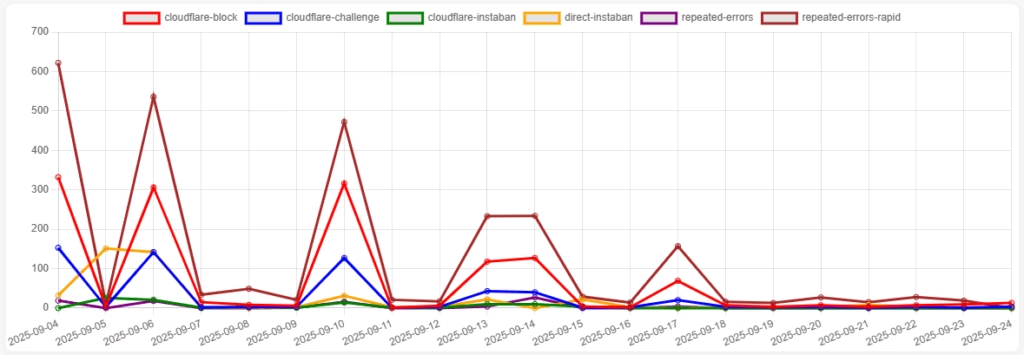
Fewer Bans, More Bots
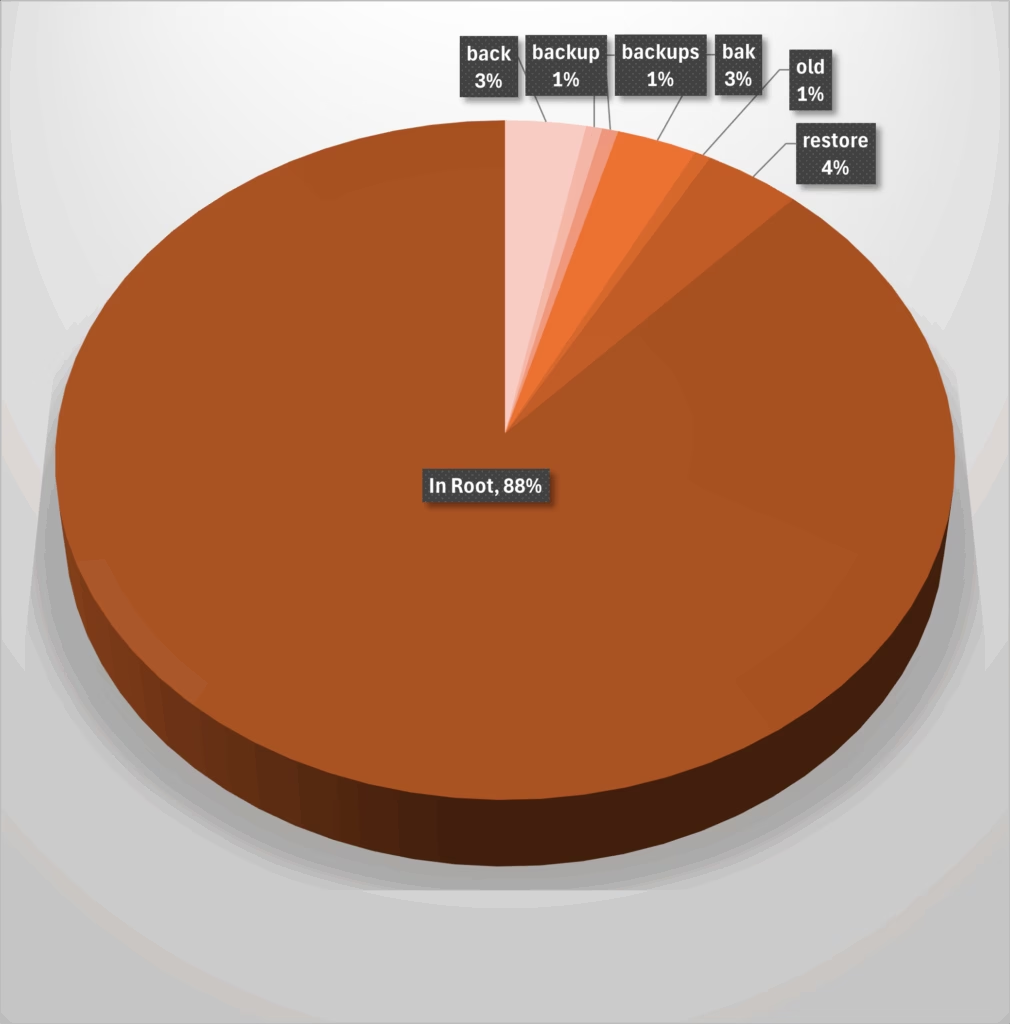
📂 Most attempts to access ZIP and RAR files focus on the website’s root folder.
🔍 Right behind root, attackers often target folders named variations of “backup” (because who doesn’t back up their website?) and “restore” (less common, but logical for recovering website data).
🗜️ ZIP archives are the top target, making up 87% of all archive access attempts.
📁 Across 1,000 samples, the filenames targeted by attackers showed wide variety with few exact repeats.
🔎 Common picks included classics like website.zip, public_html.zip (a nod to the typical root directory), archive.zip, and www.zip — all prime suspects for holding an entire website’s treasure trove.
🚫 Anyone hoping that hiding files in plain sight (a.k.a. security by obscurity) will keep their secrets safe is in for a rude awakening — attackers are bound to find them sooner or later.
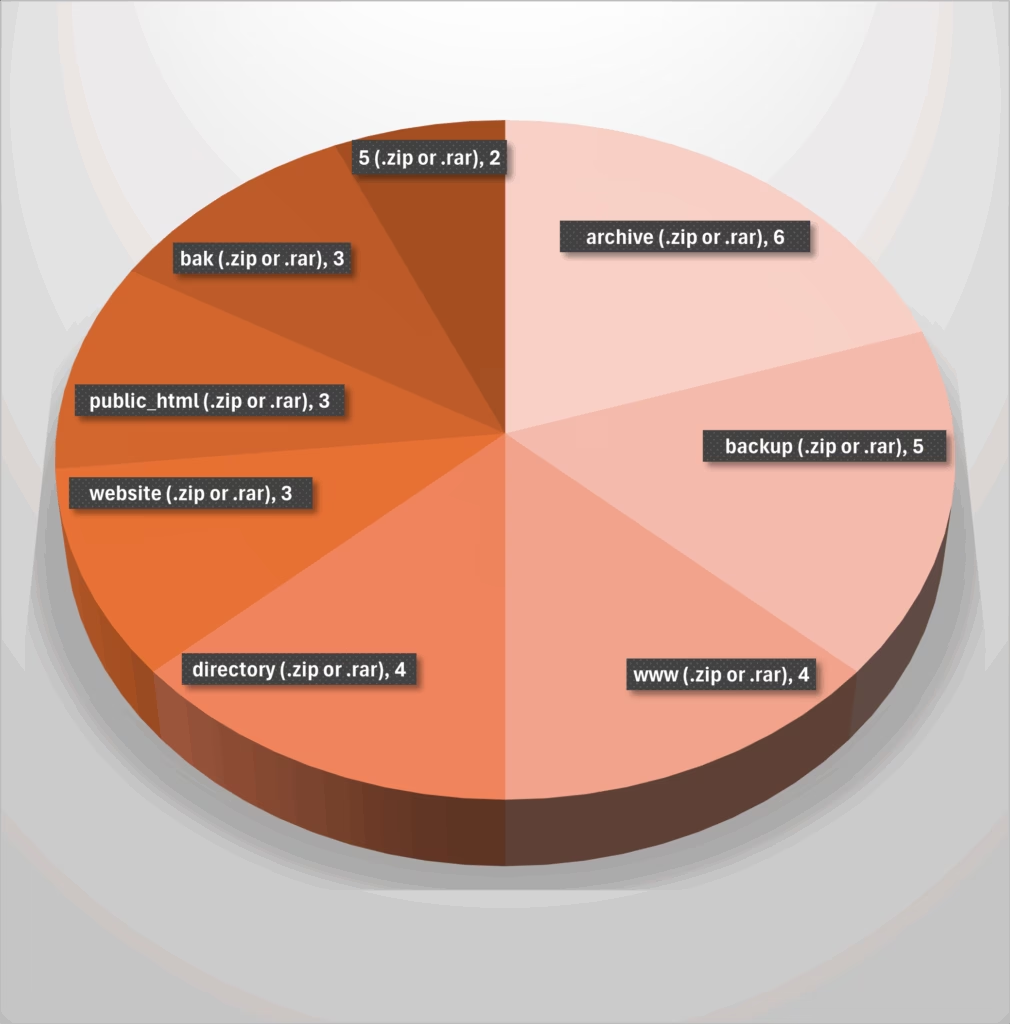
Attackers are highly likely on the hunt for secrets and sensitive information hidden within website backups.
Attackers are highly likely on the hunt for secrets and sensitive information hidden within website backups.
🕵️♂️ But it doesn’t stop there — these backup files can also be exploited to clone entire websites, setting the stage for sophisticated phishing campaigns targeting the company, its brand, and its customers.
⚠️ This makes securing backups not just a best practice, but a critical defense line in today’s digital threat landscape.
💡 To stay ahead, implement automated, regular backups following the 3-2-1 rule: keep three copies of your data, store them on two different media types, and ensure one copy is offsite. And store ⚠️ NONE OF THEM ON YOUR WEBSITE…! ⚠️
🔒 Always encrypt backups during storage and transmission, restrict access with strong authentication, and regularly test your backups to confirm they’re intact and restorable when needed.
By treating backups as a vital security asset, organizations can not only safeguard their data but also maintain trust and operational continuity in an increasingly hostile cyber environment.
Footnote: Attacks coming from China
🔍 In the logs, many intriguing filenames appeared, including “%E4%BC%A0%E5%A5%87%E7%A7%81%E6%9C%8D%E7%99%BB%E9%99%86%E5%99%A8.zip”.
🔤 This string is a URL-encoded sequence representing Chinese characters, followed by “.zip”. When decoded, it reveals the filename:
传奇私服登陆器.zip
📂 Translated to English, this means “Legend Private Server Login Tool.zip”, hinting at a specialized archive likely related to a private server login utility.
🌐 Such URL encoding of filenames is common when dealing with non-ASCII characters, ensuring safe transmission across web protocols without losing meaning or causing errors.
Other files in Chinese characters were:
- 传奇.zip — “Legend.zip”
- 23.zip — Numeric filename, likely arbitrary or sequential
- 修改版.zip — “Modified Version.zip”
- 444.zip — Numeric filename
- 客户端.zip — “Client.zip” or “Client Side.zip”
- 77.zip — Numeric filename
- 工具.zip — “Tools.zip”
- aaa.zip — Alphabetical arbitrary filename
- 新版.zip — “New Version.zip”
- 21.zip — Numeric filename
- 最新版本.zip — “Latest Version.zip”
- 25.zip — Numeric filename
- 版本1.zip — “Version 1.zip”
- 传奇登陆器.zip — “Legend Login Tool.zip”
- 版本2.zip — “Version 2.zip”
- 5.6.zip — Numeric version/number
- 登陆器.zip — “Login Tool.zip”
- 66.zip — Numeric filename
- 私服版本.zip — “Private Server Version.zip”
- 888.zip — Numeric filename
- 私服登陆器.zip — “Private Server Login Tool.zip”
- 119.zip — Numeric filename
- 私服.zip — “Private Server.zip”
- abcd.zip — Alphabetical arbitrary filename
- 配置器.zip — “Configurator.zip” or “Setup Tool.zip”
- 20.zip — Numeric filename
- 仿盛大.zip — “Emulation Shengda.zip” (Shengda is a company/game name)
- 222.zip — Numeric filename
- 0.zip — Numeric filename
- 24.zip — Numeric filename
- 传奇版本.zip — “Legend Version.zip”